


Before Starting the Identity Verification Process in GöçBil
If you are using a Vodafone Türkiye SIM card and have received an Identity Verification (Kimlik Doğrulama) SMS, you may find that the verification link provided in the message does not work or that the online identity verification process cannot be completed.
Based on users' experiences, the first stage of Vodafone's identity verification process is currently not available online for many users. Therefore, the initial verification may need to be completed in person.
Step 1: Complete Identity Verification at Vodafone
If the SMS verification link does not work or the online process cannot be completed, we recommend the following:
- Visit the main Vodafone Store (Corporate Store) or an authorized main service center in your city.
- Bring your identity document and residence permit with you.
- Ask the staff to complete the Kimlik Doğrulama (Identity Verification) process for your SIM card.
Once this step has been completed successfully, you can continue the verification process in the GöçBil application.
ARSA Recommendation: Whenever possible, visit a Vodafone Corporate Store rather than a small dealer or franchise. According to users' experiences, staff at corporate stores are generally more familiar with the identity verification procedure and are better equipped to assist customers.
Step 2: Complete Identity Verification in the GöçBil Application
After Vodafone has completed your identity verification, follow these steps:
1. Open the GöçBil application. Sign in using your e-Devlet account.
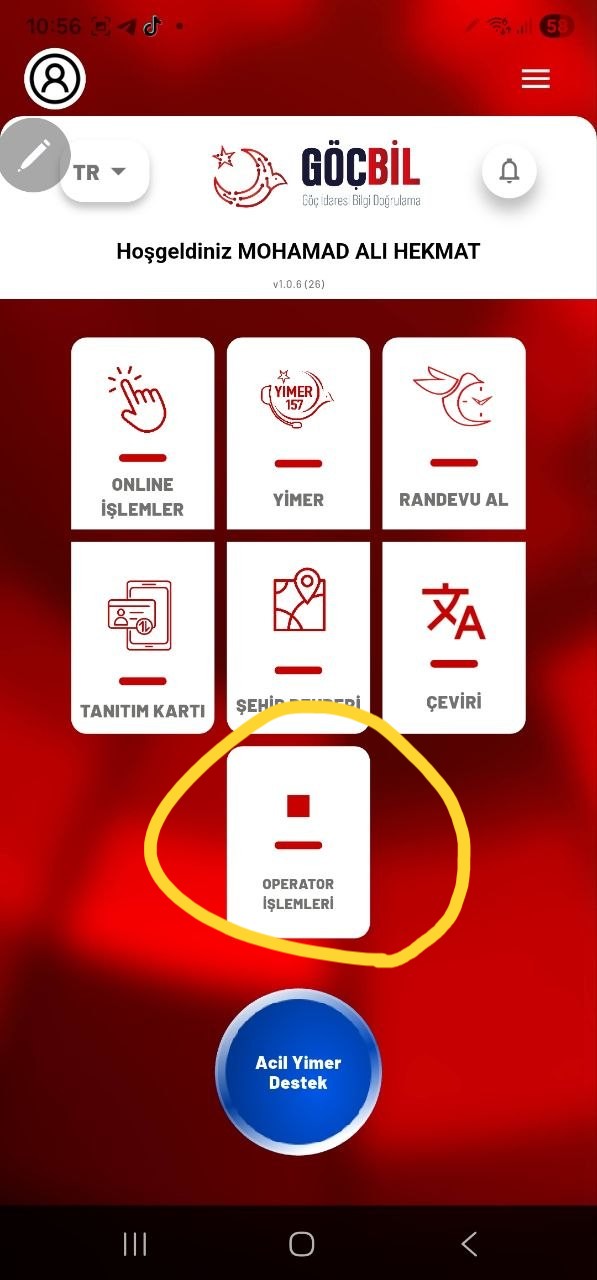
2. Select Operatör İşlemleri (Operator Transactions) from the main screen.
3. Under İşletme / Sağlayıcı Tipi (Business / Provider Type)
Select: Haberleşme (Communication)
Then click Devam Et (Continue).
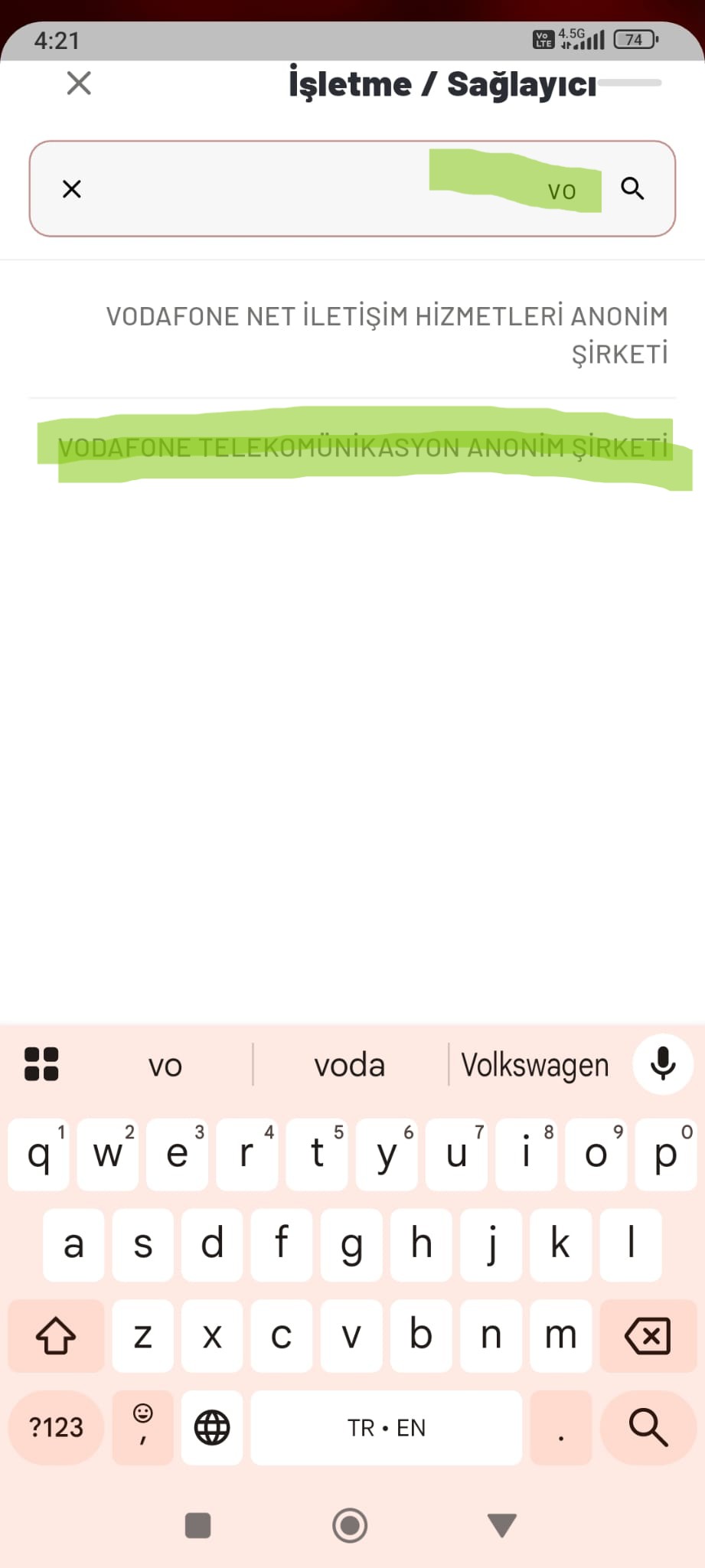
4. Under İşletme / Sağlayıcı (Business / Provider)
Search for: Vodafone Telekomünikasyon Anonim Şirketi
Select it from the list and click Devam Et (Continue).
5. Complete Face Verification
Select: Yüz tanıma ile (Face Verification)
Then carefully follow the instructions displayed on your screen:
- Look straight at the camera.
- Turn your face to the right.
- Turn your face to the left.
- Look straight at the camera again.
- Raise your face slightly upward.
- Finally, smile.
After completing the face verification successfully, click Onayla (Approve) to submit your request.
If the process is successful, your identity verification will be completed and recorded in the system.
Important Information
-
Before starting, make sure you are using the latest version of the GöçBil application.
-
Perform the face verification in a well-lit environment with a stable internet connection.
-
If you cannot find Vodafone Telekomünikasyon Anonim Şirketi in the provider list, first make sure that Vodafone has completed your identity verification.
Regarding Service Fees
ARSA has received reports from some users indicating that certain Vodafone dealers have requested payment for completing this process.
However, based on users' experiences, identity verification is generally provided free of charge at Vodafone Corporate Stores.
If you are asked to pay for this service, you may ask the staff for clarification or visit the main Vodafone Corporate Store in your city, where the service is generally provided free of charge.
Disclaimer: This guide has been prepared based on users' practical experiences and the procedures available at the time of publication. As Vodafone or the GöçBil system may update their procedures in the future, some steps or screens described in this guide may change.

Büyüt
Büyüt
Büyüt
.jpeg)
Büyüt
.jpeg)
Büyüt
.jpg)